Zoho Analytics upgrade plan
Download service pack and follow the upgrade procedure to advance to build .
Service packMD5sum value:
Follow the step-wise sequence to upgrade to the latest build
Step 1:
Download service pack 6400 and follow the upgrade procedure to advance to build 6400.
Service pack 6400MD5sum value: 9701dfaf1d1c8ee12d337e49fe0f6417
Step 2:
Download service pack and follow the upgrade procedure to advance to build .
Service packMD5sum value:
Follow the step-wise sequence to upgrade to the latest build
Step 1:
Download service pack 6300 and follow the upgrade procedure to advance to build 6300.
Service pack 6300MD5sum value: d6c44058e78146d32fe74b08979d5d6c
Step 2:
Download service pack 6400 and follow the upgrade procedure to advance to build 6400.
Service pack 6400MD5sum value: 9701dfaf1d1c8ee12d337e49fe0f6417
Step 3:
Download service pack and follow the upgrade procedure to advance to build .
Service packMD5sum value:
Follow the step-wise sequence to upgrade to the latest build
Step 1:
Download service pack 6200 and follow the upgrade procedure to advance to build 6200.
Service pack 6200MD5sum value: f22de3cf786912bec49ab1b71806d0a4
Step 2:
Download service pack 6300 and follow the upgrade procedure to advance to build 6300.
Service pack 6300MD5sum value: d6c44058e78146d32fe74b08979d5d6c
Step 3:
Download service pack 6400 and follow the upgrade procedure to advance to build 6400.
Service pack 6400MD5sum value: 9701dfaf1d1c8ee12d337e49fe0f6417
Step 4:
Download service pack and follow the upgrade procedure to advance to build .
Service packMD5sum value:
Follow the step-wise sequence to upgrade to the latest build
Step 1:
Download service pack 6100 and follow the upgrade procedure to advance to build 6100.
Service pack 6100MD5sum value: faab62451b9bd086c83ead4bd3c7de2f
Step 2:
Download service pack 6200 and follow the upgrade procedure to advance to build 6200.
Service pack 6200MD5sum value: f22de3cf786912bec49ab1b71806d0a4
Step 3:
Download service pack 6300 and follow the upgrade procedure to advance to build 6300.
Service pack 6300MD5sum value: d6c44058e78146d32fe74b08979d5d6c
Step 4:
Download service pack 6400 and follow the upgrade procedure to advance to build 6400.
Service pack 6400MD5sum value: 9701dfaf1d1c8ee12d337e49fe0f6417
Step 5:
Download service pack and follow the upgrade procedure to advance to build .
Service packMD5sum value:
Zoho has announced end of technical support for Zoho Analytics build 5500 and below, effective from September 15, 2025. If you're using any of these older builds, click here for instructions to upgrade.
Get to know more about the latest features, enhancements and issues fixed in the what's new page.
If you are new to Zoho Analytics, please download the full build.
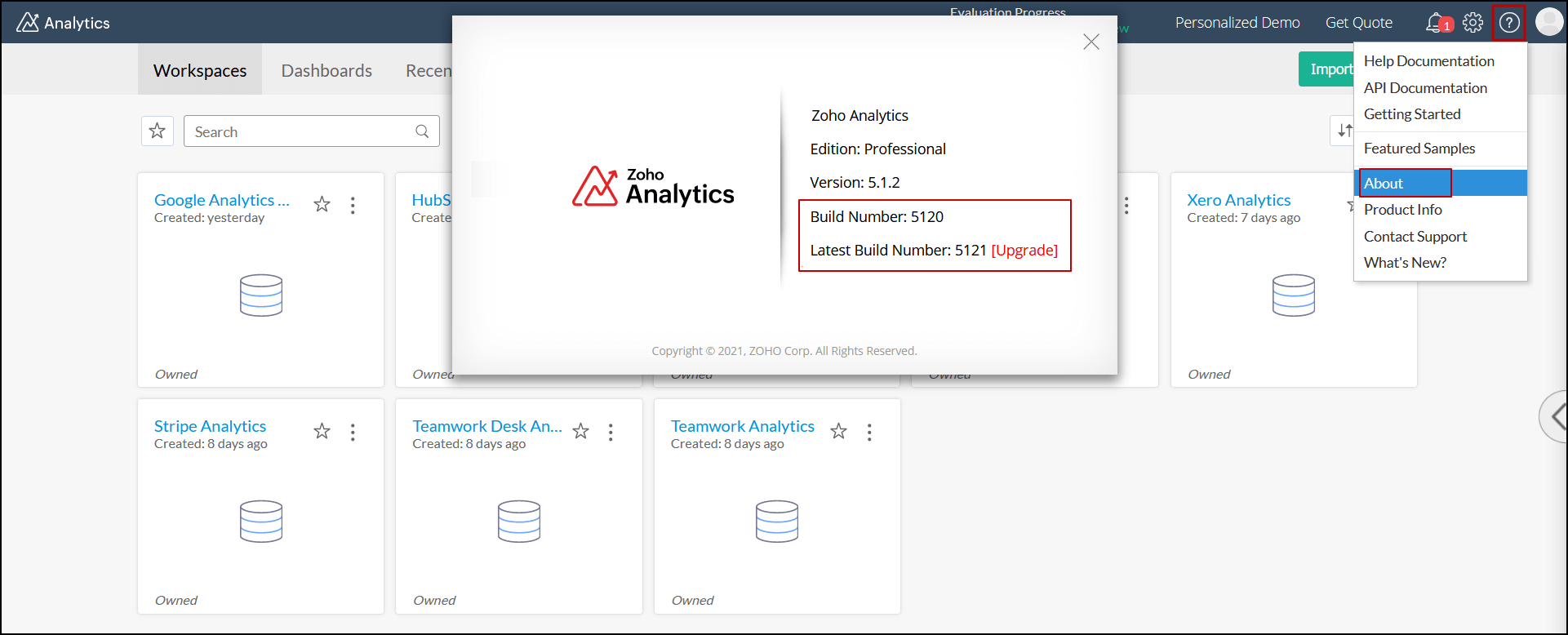
How to locate my existing and latest build number?
- Open your Zoho Analytics application.
- Click the Help icon and choose About from the drop-down. You can find your present and latest build number in the pop-up that appears.
Upgrade process
To upgrade Zoho Analytics from one build to another, follow the steps detailed in this documentation.