Set selected user as record owner
Record owner property enables you to assign a field to identify the owner of a record. The default choice selected for record owner in a form is the Added User field. To set a record owner:
- Open the form builder.
- Click the Settings icon on the top right corner. The Form Properties pane will open
- Go to the Role hierarchy section. Added User will be selected by default.
-
Click the dropdown. The list of user fields will be displayed.
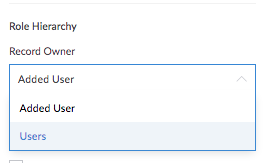
- Select the required user field. The changes are saved automatically.

The same change will reflect in the Role Hierarchy section that is available in Settings->Users->Roles .