- HOME
- BI & Analytics
- AI-Powered BI Tools in 2026: Comparison Matrix
AI-Powered BI Tools in 2026: Comparison Matrix
- Last Updated : June 22, 2026
- 3.3K Views
- 12 Min Read
Choosing a business intelligence tool usually starts with a simple question: how fast can a team get to the answer they need? Some tools are built for reporting. Others are better for forecasting, automation, or working with data in plain English. The best one depends on how people actually use it day to day.
AI has changed that search a bit. It makes BI tools easier to use, cuts down on manual work, and helps teams find patterns without spending hours inside a dashboard. With the right AI-powered BI tool, teams can ask questions in plain English and get instant answers, spot trends and predict what's coming next, and even automate data preparation and BI reporting.
In this guide, we’ll look at the best AI business intelligence tools and what each one does well.
Top 5 AI-powered BI tools
Multiple platforms have integrated AI to enhance their analytics capabilities, making data analysis more accessible, automated, and insightful. Whether it's predicting trends, answering questions in plain English, or automating reports, AI is changing the way businesses analyze data. But not all AI-powered BI tools are built the same. Some offer advanced machine learning models, while others focus on user-friendly automation.
1. Zoho Analytics: All-in-one AI Business Intelligence Platform
Zoho Analytics is a modern self-service BI and analytics platform that helps organizations turn raw data into actionable insights. It's built for businesses of all sizes, and for users of all levels of technical expertise. At its core is Zia, Zoho's AI assistant, which enables users to ask questions in plain English, generate reports automatically, and predict business outcomes without any technical expertise.
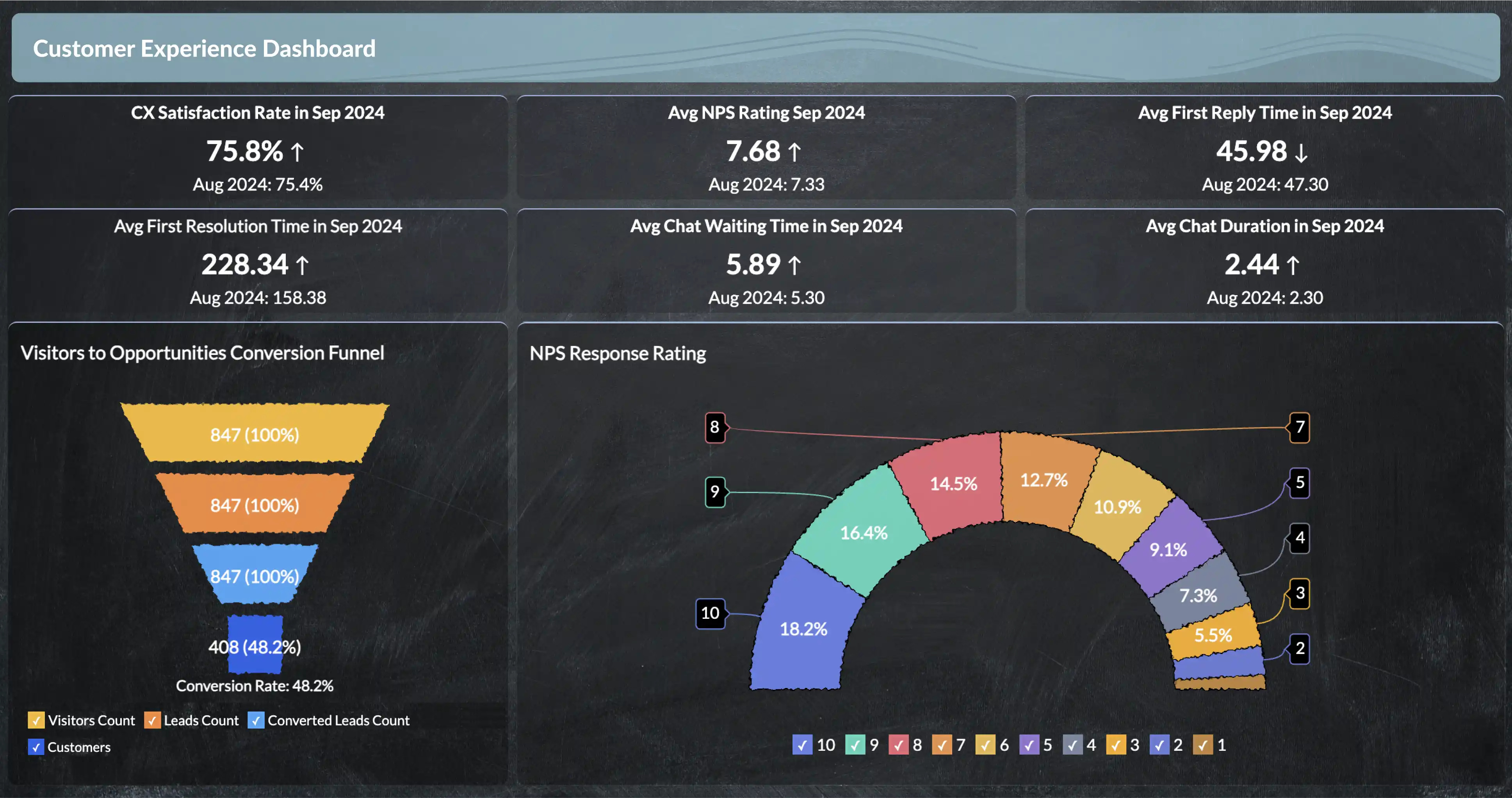
Key features
- Zia, the AI assistant: Ask questions, generate visual reports, and identify key insights effortlessly.
- Predictive analysis: Forecast trends, anticipate business outcomes, and plan decisions based on AI-driven forecast.
- Smart data-prep: Automate data cleaning, blending, and transform data without manual coding.
- AI-generated insights: Get contextual insights and anomaly alerts instantly.
- Augmented visual analytics: Create beautiful data visualizations and interactive dashboards with AI-driven suggestions.
Pros:
- Intuitive, no-code interface that is easy to use for both technical and non-technical users.
- Affordable, scalable, and built for businesses of all sizes.
- Integrates seamlessly with 500+ data sources and third-party apps.
Cons
- Some advanced customization features may require a bit of learning time for new users.
Pricing
Starting at $8/user/month, makes Zoho Analytics the most affordable AI-powered BI platform. It also offers a free plan and a 15-day trial for new users to explore its features.
2. ThoughtSpot: Search-driven analytics
ThoughtSpot is a search driven analytics tool that brings the simplicity of Google-like search to BI. Users can simply type a question like "monthly sales by region", and get instant, AI-generated answers and visualizations powered by SpotIQ.
Key features
- Search-based analytics: Instant answers generated by natural language querying.
- SpotIQ AI: Detects trends, anomalies, and key business patterns.
- Self-service dashboards: Enable employees to explore data independently.
Pros
- User-friendly with fast adoption.
- Real-time, search-based insights.
- Great for quick, self-service data exploration.
Cons:
- Over priced for smaller teams.
- Limited customization for visualizations compared to full BI suites.
Pricing
Offers custom pricing based on data volume and user needs. It is positioned as a premium solution with enterprise-grade AI features and a free trial to get started.
3. Tableau: AI-driven visual analytics
Tableau is a data visualization tool, powered by Salesforce's Einstein AI, and transforms data into interactive visual stories. Its Explain Data and Ask Data features allow users to go beyond static dashboards, helping them understand why trends are happening.
Key features
- Einstein AI: Automated predictions and generates insights from your data.
- Explain data: Identifies key drivers behind data shifts automatically.
- Advanced visualizations: Build interactive, data-driven stories.
- Ask data: Interact with your data using natural-language queries.
Pros
- Market-leading visualization capabilities.
- Seamless integration with Salesforce for predictive analytics.
- AI-powered insights with Einstein discovery.
Cons
- Steep learning curve for beginners.
- Can become expensive for larger teams.
Pricing:
Plan starts at $75/user/month with price varying for individual, team, and enterprise deployments. A free trial is available to get started.
"We looked at Tableau and Power BI. Both were very complicated and costly. We wanted something that we will be able to handle, and didn’t want to hire a FTE specifically for analysis. And thanks to the free trial offered by Zoho Analytics, we got a hands-on experience. Also it's not expensive, so why would I look for something else?"
Alejandro Carbonell
Co-founder, Tutorez
4. Microsoft Power BI: AI-powered enterprise analytics
Microsoft Power BI combines business analytics and AI through the strength of Microsoft's Azure AI services and the Microsoft ecosystem. It lets users create, share, and act on data insights seamlessly. With AI-powered modeling, natural-language querying, and Cortana voice commands, Power BI helps teams automate insights across the Microsoft ecosystem.
Key features
- Azure AI & ML integration: Leverage Microsoft's AI for data modeling and insights.
- Cortana voice querying: Ask questions using voice commands.
- Power automate integration: Trigger workflows directly from insights.
- AI-powered visualizations: Automatically selects visuals for your data.
Pros
- Deep integration across Microsoft products.
- Enterprise-grade security and scalability.
- Cost-effective for organizations already using Microsoft tools.
Cons
- Complex for users outside the Microsoft ecosystem.
- Limited flexibility in customizing dashboards compared to competitors.
Pricing
The Pro plan starts at $10/user/month, while the Premium plan begins at $20/user/month. For organizations already using Microsoft products, Power BI can be effective.
5. Qlik: AI-driven automation
Qlik offers an AI-augmented analytics platforms that blends automation with deep contextual insights. Its Cognitive Engine automatically identifies relationships in data and suggests the best way to visualize or act on it, helping teams move from reactive to proactive decision-making.
Key features
- Qlik Cognitive Engine: AI that auto-detects data patterns and relationships.
- Augmented intelligence: Enhance user decision-making with contextual recommendations.
- Qlik AutoML: Build and deploy ML models without coding.
Pros
- Strong automation and real-time analytics.
- Robust data governance and scalability for large enterprises.
- Great for complex, multi-source data environment.
Cons
- Requires technical setup for optimal performance.
- UI feels less intuitive compared to newer BI tools.
Pricing
It offers flexible pricing for teams of different sizes, along with a free trial to test its features.
Quick comparison of the top 5 AI-powered BI tools:
| Tool | Key AI capabilities | Ideal use-case | Pricing |
| Zoho Analytics | Conversational AI with NLP (Zia), predictive analytics & forecasting, no/low-code ML model builder, automated insights | Small to mid-sized businesses wanting strong AI + BI in one affordable platform | Starts at $8/user/month with free trial available. No credit card required |
| ThoughtSpot | Search-driven analytics, NLP interface, anomaly and trend detection | Non-technical business users who prefer a simple, search-style analytics | Starts at $50/user/month, enterprise pricing on request |
| Tableau | AI-assisted insights via Einstein, NLP querying, advanced visual storytelling | Enterprise focused on rich visual analytics and intuitive data exploration | Starts at $75/user/month, higher for enterprise licenses |
| Microsoft Power BI | Generative AI with Copilot, NLP, deep Azure ML & Microsoft ecosystem | Large enterprises operating within the Microsoft stack | Free tier available. Pro plan starts at $10/user/month, advanced AI via Premium. |
| Qlik | AI-augmented analytics, associative data engine, and Auto ML | Business needing flexibility in data exploration and strong predictive analytics | Custom pricing |
Why Zoho Analytics is the best AI-powered BI tool
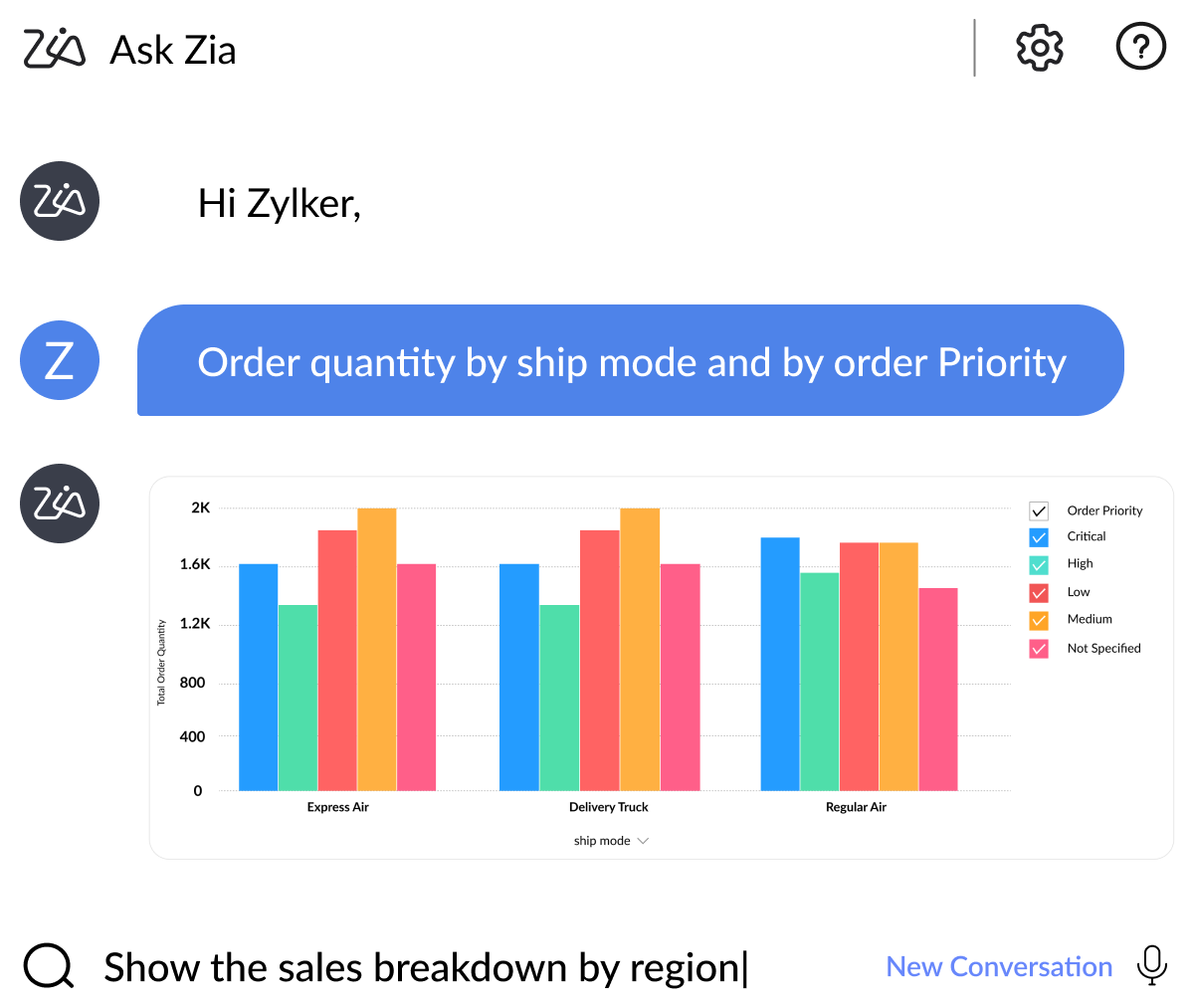
Zia
Zia is the AI layer inside Zoho Analytics that helps people get to answers without having to build everything manually. You can ask questions in plain English and get a relevant chart or answer back quickly. Zia is useful when teams know what they want to find but do not want to spend time drilling through tables and filters to get there. Instead of starting from scratch every time, users can use Zia to surface the right report faster and reduce the back-and-forth between a question and a usable result. For business users, Zia makes analytics feel less technical and more usable in day-to-day work.
"The Ask Zia and Zia Insights features are so cool. I can ask for a specific agent name for their quarterly or monthly performance and get to see if their sales numbers are trending up or down, and from which geographic areas their sales are coming from. I can also dive into why they can't close deals in other areas and try to replicate the successful ones."
John Sheldon
Business Intelligence Manager, Renu Energy Solutions
Zia Insights
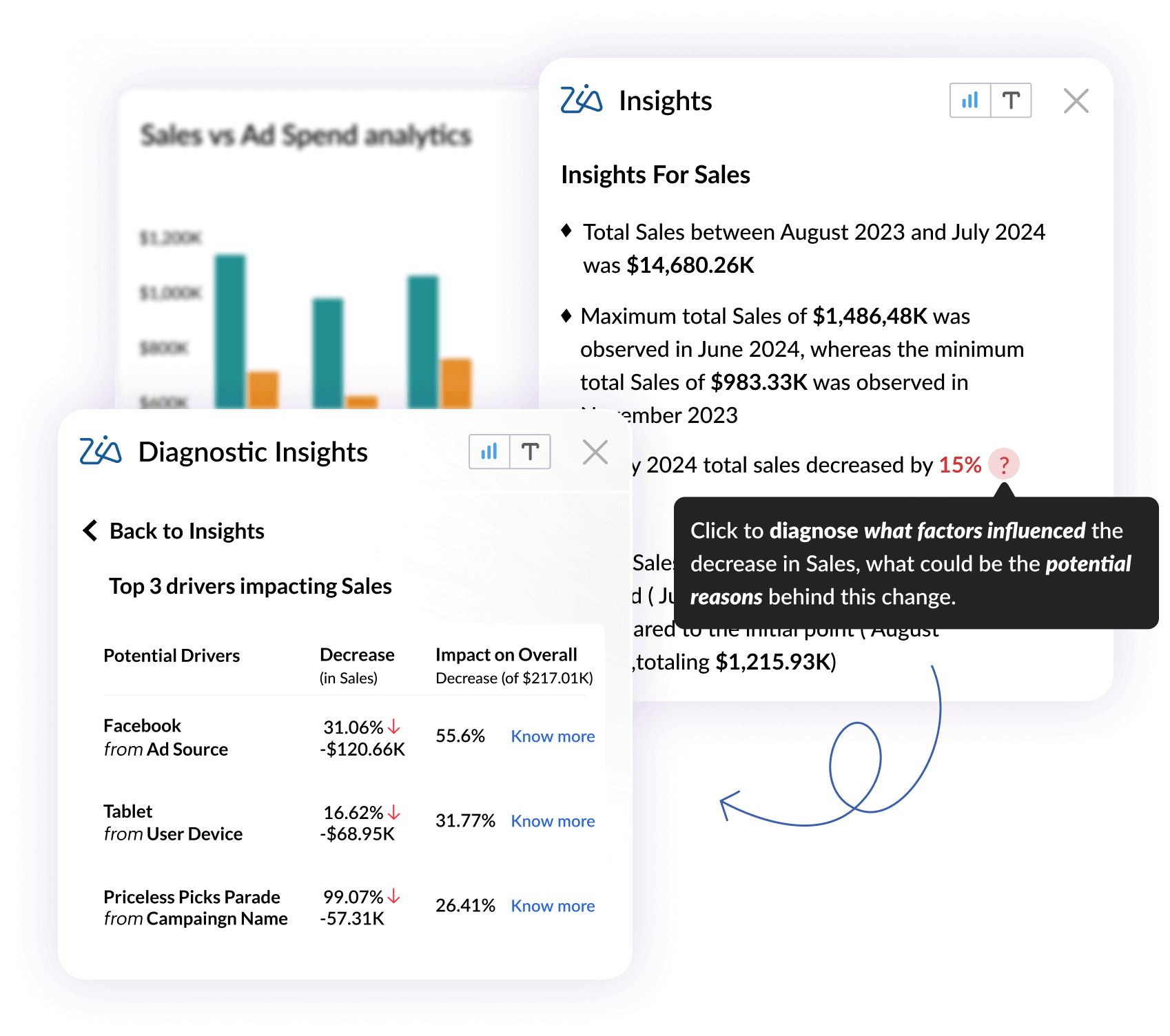
Zia Insights goes a step beyond search. It looks at the data inside a report and pulls out patterns and outliers that may not be obvious at first glance. It can turn numbers into short narratives, so you do not have to inspect every chart manually to understand what changed. That matters when the report is crowded or the trend is easy to miss. Zia Insights helps users see what moved, where the change happened, and what to look at next. It is especially useful for teams that want a quick explanation before they dig deeper into the data themselves.
Generative AI
Zoho Analytics uses generative AI to make the reporting experience faster and more contextual. It can surface actionable insights in text and visual form, generate explanations for what is showing up in a report, and help users create dashboards and visualizations more quickly. That saves time for people who need a clean summary without building every view from scratch. It also improves the handoff between raw data and decision-making. Users can click into a report, get an instant explanation, and move from “what am I looking at?” to “what should I do next?” without starting a separate analysis cycle.
Predictive analysis
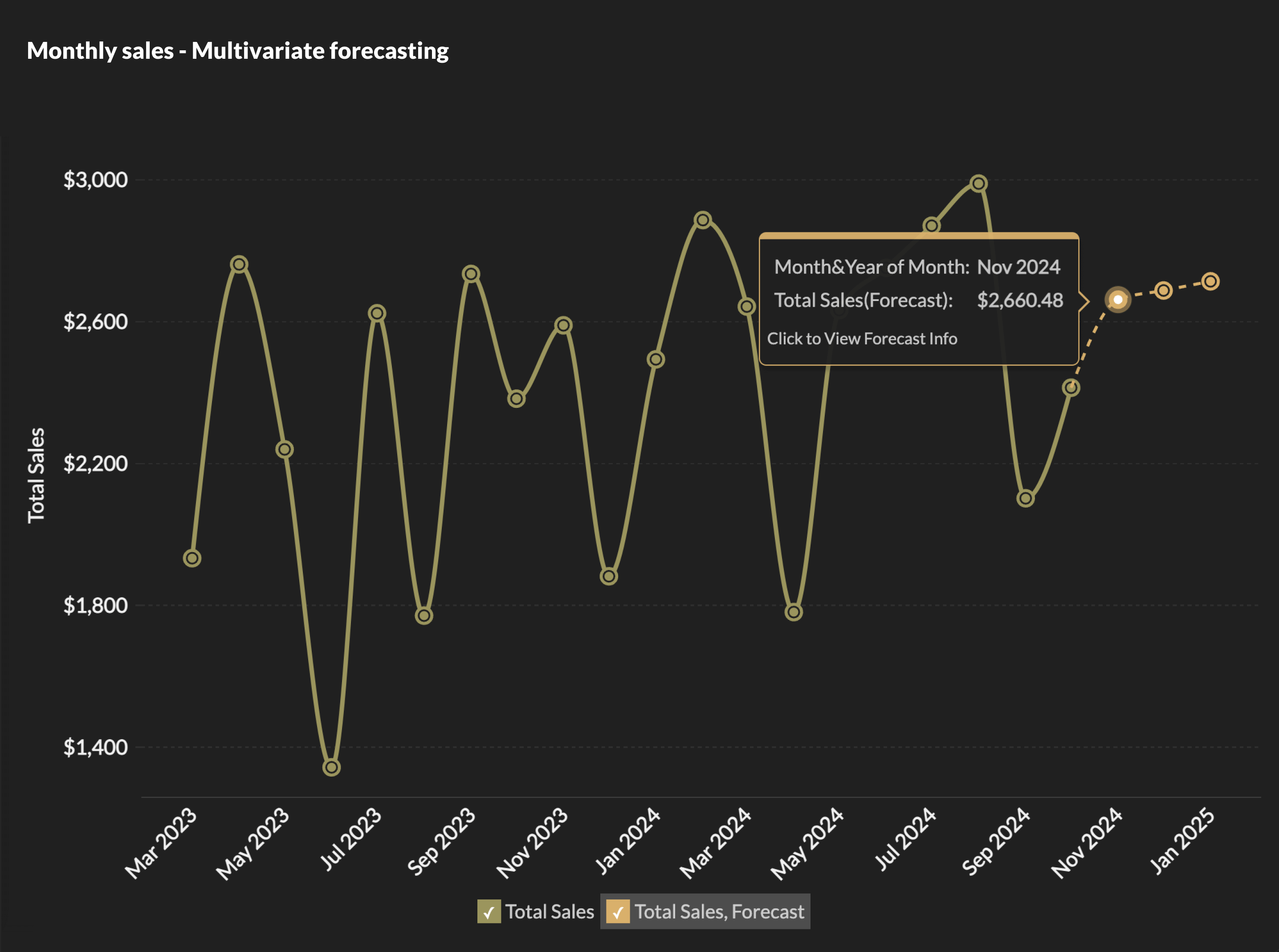
Zoho Analytics includes forecasting and anomaly detection features that help teams look beyond historical reporting. Zoho Analytics supports multiple forecasting models, including ARIMA, ETS, STL, and regression, so users can choose the approach that fits their data better. That gives teams a more practical way to predict future performance instead of relying only on past trends. It also flags unusual movements in the data through anomaly detection and smart alerts. For teams that track sales, operations, or customer behavior, that can surface issues early and make it easier to respond before a small change turns into a larger one. Clustering adds another useful layer by grouping similar data points, which helps users spot segments and patterns they might miss in a flat report.
DSML Studio
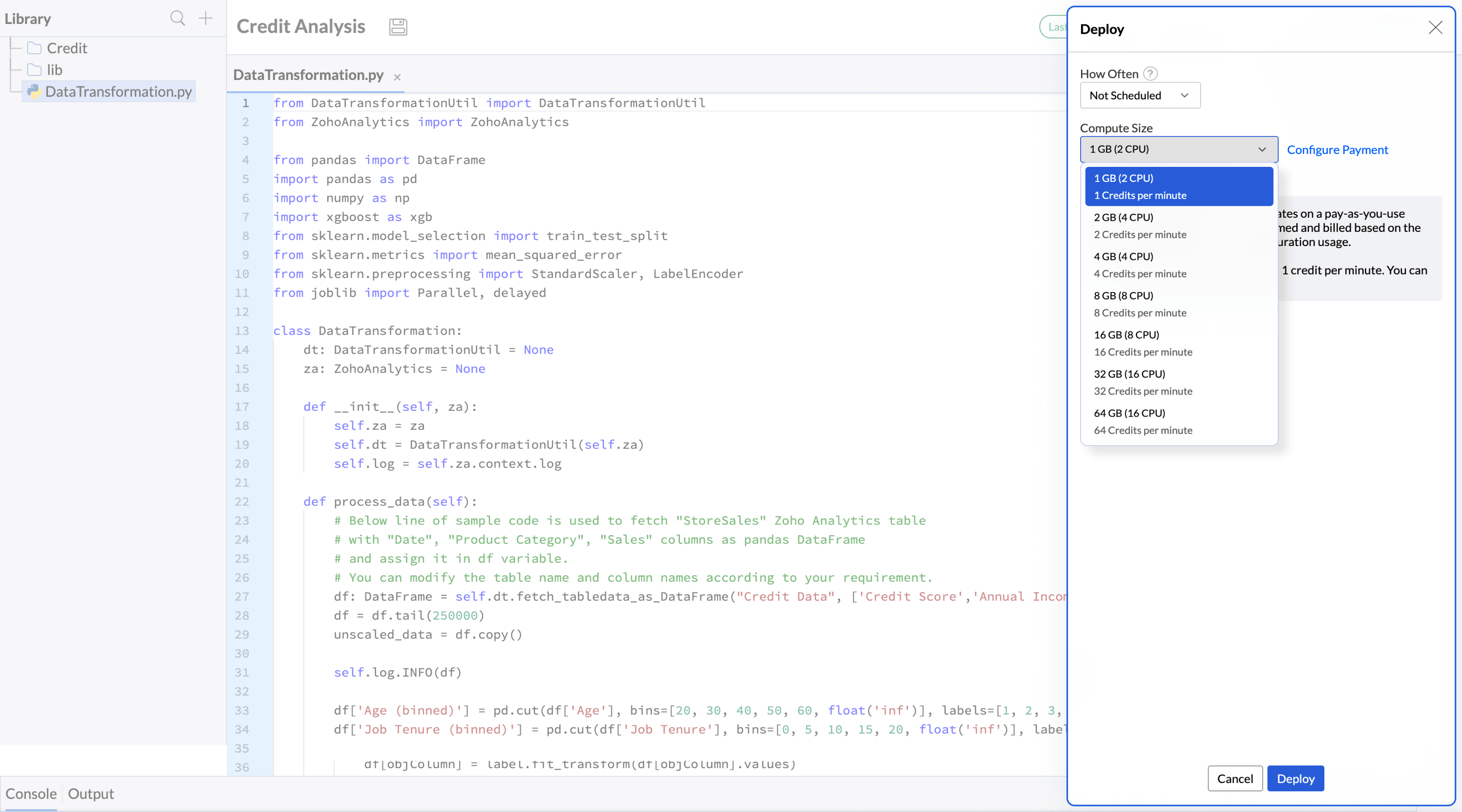
DSML Studio is for teams that want more control over machine learning inside Zoho Analytics. The no-code model builder lets users create ML models without needing a full data science stack, which makes advanced analytics more accessible to business teams. For more technical users, Code Studio opens the door to custom models and functions. That gives teams room to go beyond standard forecasting or detection and build workflows that fit their own data and use cases. It is a strong fit when the built-in AI features are useful, but the team needs something more specific than the default setup.
Why AI Powered BI tools matter more than ever
AI-powered BI tools matter because business data keeps growing faster than most teams can process it. McKinsey’s 2025 State of AI survey found that 88% of organizations now use AI in at least one business function, up from 78% the year before. That tells you something simple: AI is no longer sitting on the side of the business. It is already built into how companies work, and BI is one of the places where it adds real value.
The reason this matters for BI is practical. Teams are dealing with larger datasets and tighter reporting cycles to make decisions quickly. AI helps by cutting down the time spent on manual analysis and making it easier to ask questions in plain English. Instead of waiting on static reports, people can get answers while the context still matters.
That is why AI-powered BI tools are becoming a real part of everyday decision-making. They help teams move through data faster, reduce repetitive work, and focus on what the numbers are actually saying. For businesses that rely on speed and accuracy, that is hard to ignore.
Ready to experience the future of BI?
Transform your data into decisions with Zoho Analytics, your all-in-one AI-powered BI platform.
Start your free trial now or get a personalized demo today and see what the future of BI looks like.
AI-powered. Business focused. Zoho Analytics.
FAQs on AI-powered BI Tools
Is there any AI-powered BI tool that provides proactive campaign insights?
Yes. Many modern AI-powered BI tools, including Zoho Analytics and Tableau, can surface proactive campaign insights by spotting performance shifts, anomalies, and engagement trends early. That helps teams notice what is working, what is slowing down, and where a campaign may need attention before the numbers move too far in the wrong direction.For marketers, this is especially useful when campaign data is spread across channels. AI can help connect the dots across traffic, conversions, and audience behavior, so teams do not have to manually check every report. It is a faster way to understand which campaigns need a push and which ones are already performing well.
Who provides business intelligence tools with AI-generated insights?
Leading BI platforms like Zoho Analytics, Power BI, and Tableau now include AI-driven insight engines that can analyze data automatically and surface important findings. These tools can summarize changes, highlight unusual patterns, and explain what is happening inside a report without requiring a user to inspect every chart by hand. That matters when teams need quick answers and do not want to rely only on static dashboards. AI-generated insights make it easier to move from raw numbers to a working explanation, which is useful for sales, marketing, finance, and operations teams alike. Some tools also go a step further by suggesting likely causes or next steps based on the data.
Can we combine AI and BI for smarter business decisions?
Absolutely. When AI and BI work together, businesses get more than historical reporting. They can move toward predictive analysis, trend detection, and faster decision-making based on patterns that are already showing up in the data. This combination helps teams make better calls with less guesswork. Instead of looking only at what already happened, they can forecast what may happen next and use that insight to plan campaigns, manage inventory, or adjust strategy. It also makes BI more practical for everyday decisions, not just quarterly reviews.
How to integrate AI forecasting with reporting features?
AI forecasting is built into many BI platforms, including Zoho Analytics, where users can create predictive models directly inside reports and dashboards. This lets teams compare current performance with projected outcomes in one place, instead of jumping between separate tools. That makes forecasting easier to use in real business workflows. For example, a sales team can track revenue trends, see where numbers are likely to land, and monitor how far actual performance is from the forecast. It gives reporting more context and helps teams act earlier when results start moving off track.
Which platforms offer the best price-per-user for AI-driven BI?
If price-per-user is the main filter, Microsoft Power BI is one of the strongest options because it starts at a relatively low monthly cost and still includes AI features like Copilot on higher plans. Tableau is another major player, but its creator seats get expensive fast. Oracle Analytics Cloud, Qlik Sense, and Looker are also worth comparing, though their pricing is usually more enterprise-oriented and often depends on a custom quote. If you want the best value, the right question is not just “what costs less per user?” It is also “what AI features are included at that price?” A cheaper seat with weak AI may cost more in time later.
What are the best BI tools with built-in AI capabilities?
The strongest AI-enabled BI platforms right now include Zoho Analytics, Microsoft Power BI, Tableau, Google Looker, Qlik Sense, and ThoughtSpot. These tools go beyond static reporting and add features like conversational querying, automated insights, anomaly detection, forecasting, and AI-generated summaries. If you are choosing for a team, look at how the AI is used. Some tools are better at asking questions in plain English. Others are stronger at forecasting, dashboard generation, or data storytelling.
Is there any generative BI solutions that can automatically create dashboards from plain english questions?
Yes. Several platforms now support generative BI or conversational analytics that turn plain English prompts into dashboards, charts, or reports. Power BI Copilot, Tableau with Einstein features, ThoughtSpot, Looker with Gemini, and Zoho Analytics with Zia all support some version of this workflow. This is useful when teams know the question but do not want to spend time building every chart by hand. You describe the analysis, and the system helps create the visual output faster.
What are the best AI-powered tools for self-service business intelligence that enable conversational data querying?
For self-service BI with conversational querying, the strongest names are ThoughtSpot, Microsoft Power BI, Tableau, Looker, Qlik Sense, and Zoho Analytics. These platforms let users ask questions in plain English, explore data without waiting on analysts, and get answers in the form of charts, summaries, or reports. If your team wants less dependency on manual reporting, this is the category to watch. The better tools reduce the gap between “I have a question” and “I have an answer.”
What are the most popular AI for BI tools for replacing static dashboards?
The most popular AI-powered BI tools for replacing static dashboards include Zoho Analytics, Power BI, Tableau, ThoughtSpot, and Qlik Sense. These platforms give users more than fixed reports. They let people ask questions, explore data in real time, and get AI-generated insights without waiting for a new dashboard layout to be built. This matters because static dashboards can only show what was planned in advance. AI-powered BI tools make the experience more flexible. Users can dig into trends, spot anomalies, and follow up with new questions as they come up, which makes reporting feel more active and useful.
 Vinisha
Vinisha is a Marketing Analyst at Zoho Analytics with a strong passion for both marketing and data. She’s naturally curious about trends and loves diving into data to uncover what drives effective campaigns. She has a knack for simplifying complex information and presents insights in a relatable and engaging way that connects with audiences. Outside of work, she enjoys exploring the creative side of digital marketing.
Comments(1)
Given the article on AI-powered BI tools, consider asking readers a question that invites them to compare AI-driven insights with traditional BI approaches, while naturally tying in the linked resource. A natural, educational prompt could be: "Have you tested how natural language queries and automated insights from tools like Zoho Analytics or Power BI change your decision-making speed and accuracy in real projects? For those exploring local visibility strategies, how might integrating such AI-driven BI assist in measuring campaign performance across channels like GBP or Apple Maps?"