- HOME
- What are agentic workflows and when should you use them?
What are agentic workflows and when should you use them?
- Last Updated : June 24, 2026
- 15 Views
- 8 Min Read
Key takeaways
- Agentic workflows use AI to evaluate context and decide the next action, instead of following fixed rules.
- Zoho Flow's agentic actions use AI to pick from a set of actions you define, based on the trigger context.
- Use cases range from support ticket routing to invoice processing, employee onboarding, and refund handling. You can set up your first agentic action in Zoho Flow in a few steps, without any coding.
Automation has come a long way from simple "if this, then that" rules. Today, businesses are starting to expect more from automation. Gartner predicts 40% of enterprise applications will feature task-specific AI agents by 2026, up from less than 5% in 2025. The gap between those two numbers says a lot about how fast this is moving.
Agentic workflows are what's driving that shift. If you haven't come across the term yet, this article will walk you through what it means, how it works inside Zoho Flow, and how you can start using it today.
What is an agentic workflow?
An agentic workflow is an automated process where an AI agent reads context, makes decisions, and takes the right action. The agent reads the data in the trigger, the content of a message, and the value of a field, and picks the most appropriate action based on what is actually happening.
Here's an example. An employee submits an expense claim. An agentic workflow reads the amount, the category, and whether it falls within company policy. Based on that context, it picks the right action: Auto-approve the claim, route it to the employee's manager, or flag it for finance review.
The good news is that agentic workflows are no longer something only large technical teams can build. Here's how Zoho Flow makes it possible.
Agentic workflows in Zoho Flow
Zoho Flow's agentic capabilities work because of Zia, Zoho's built-in AI. Within a flow, you can add an agentic action step where Zia evaluates the context of a trigger and decides which action to take from a set of options you define.
Say a new lead comes into Zoho CRM with a deal size above a certain value and the word "urgent" in the notes. Instead of you building separate branches for every possible combination of conditions, Zia reads the context and picks the right action: Assign to a senior sales rep, send a priority alert, or schedule an immediate follow-up.
Two things are worth understanding before you start building. First, you're not giving Zia open-ended control. You define the actions it can choose from, and for each field, you decide how much of the decision belongs to Zia. You can enter a fixed value yourself, select Let AI decide to allow Zia to fill it dynamically, or leave the field empty.
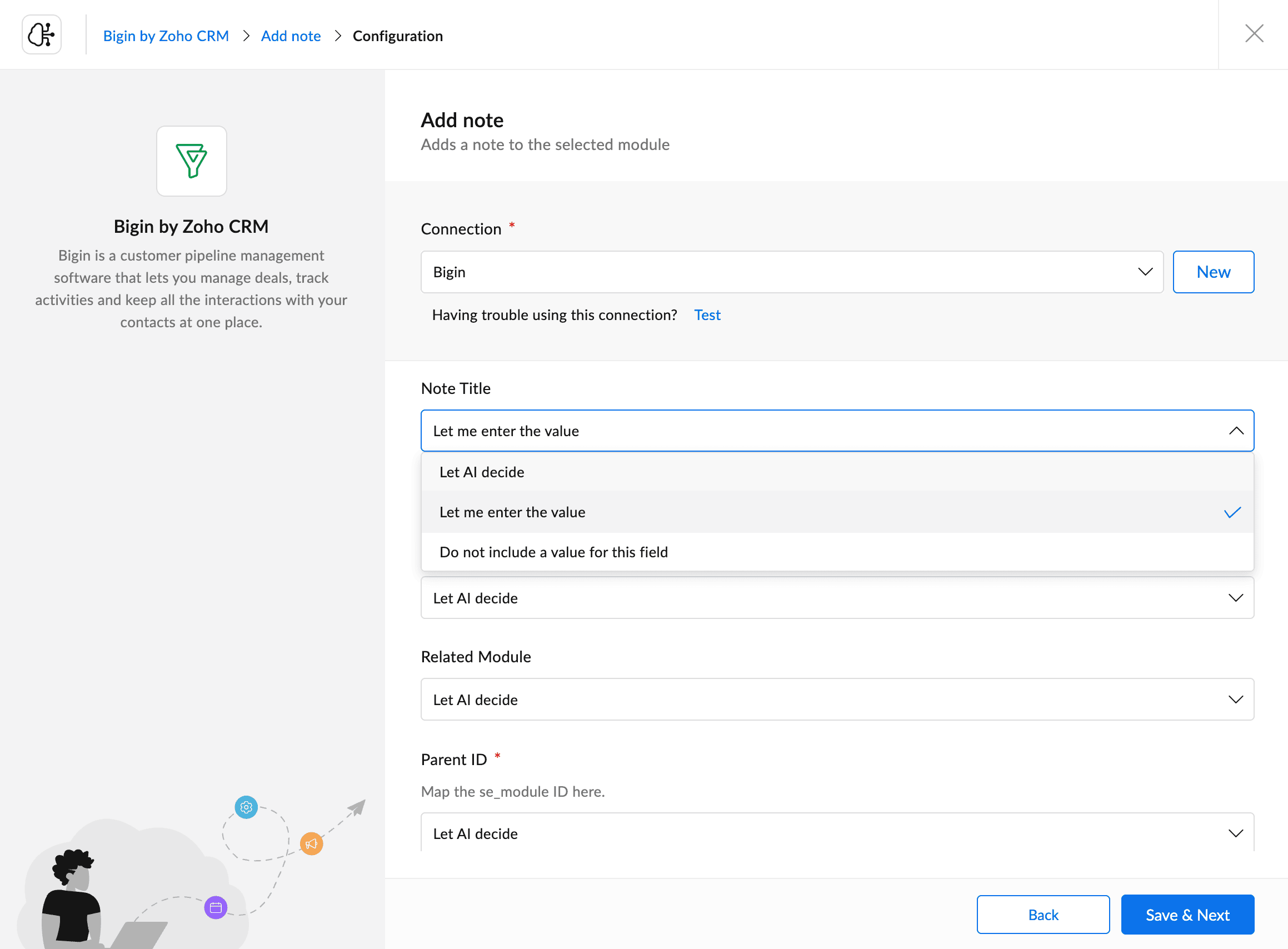
Second, because every possible action is predefined by you, your business-critical workflows stay within the boundaries you draw, without the risk of unexpected actions or data ending up in the wrong place.
One expert suggestion to keep in mind: The more a workflow impacts your business, the more human oversight it needs. You can give AI control over day-to-day decisions, but for anything business-critical, always keep a manual checkpoint.
Now that you know how it works, here's how teams are actually putting it to use.
Practical use cases in Zoho Flow
Support ticket evaluation and routing
The problem
Your support team receives dozens of tickets a day. Some are simple how-to questions, and others are urgent escalations or billing issues. Manually reading and routing each one takes time, and mistakes mean the wrong tickets reach the wrong people.
How Flow solves it
A new ticket in Zoho Desk triggers the flow. Zia reads the ticket content and checks its issue type, sentiment, and urgency. Based on the analysis, it picks the appropriate action from your defined options: Auto-resolve with a knowledge base response, assign to a tier-1 agent, or escalate to a senior specialist.
The outcome
Tickets reach the right person faster. Low-priority issues get resolved without manual involvement. Your support team focuses on the cases that actually need attention.
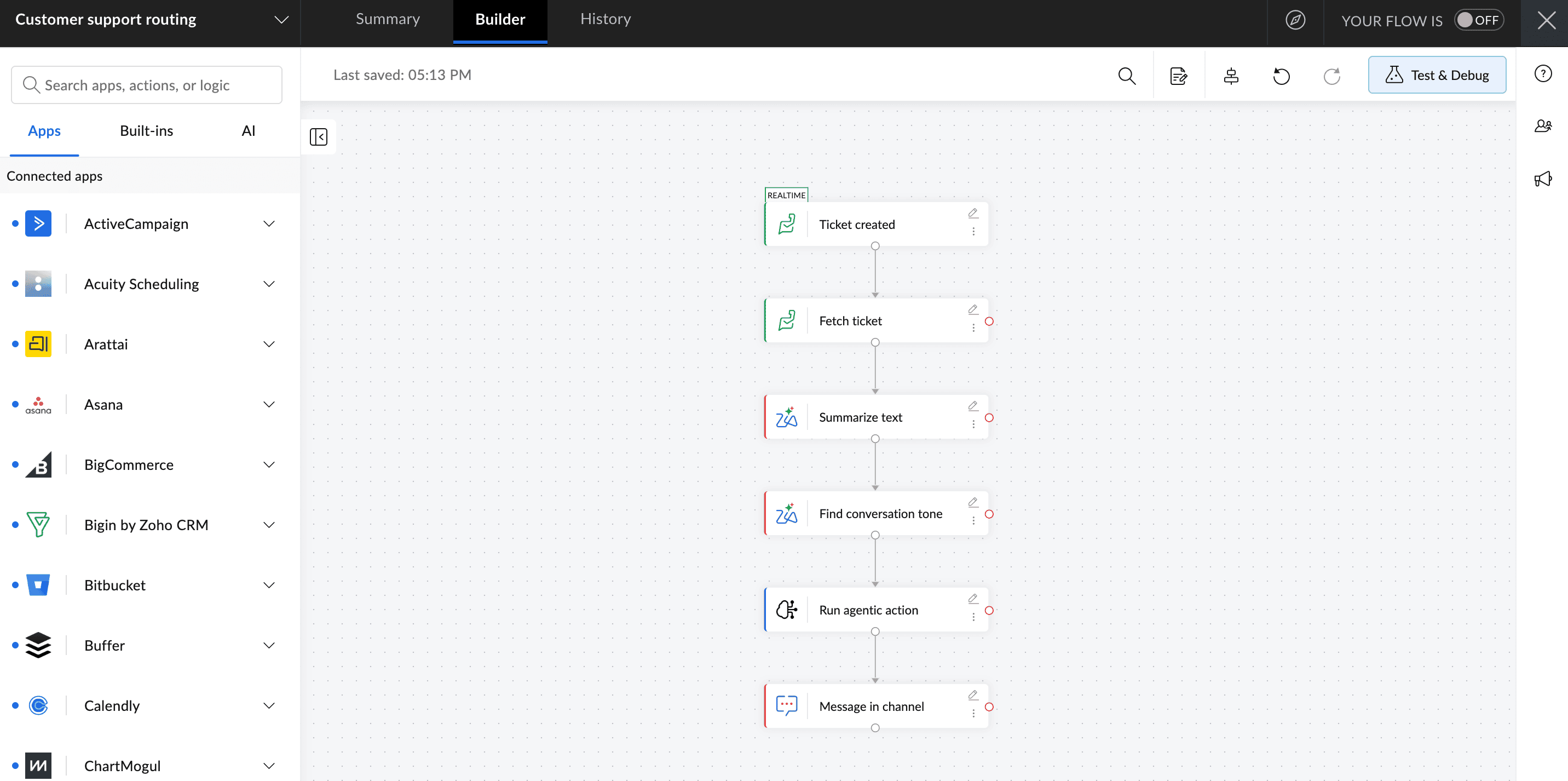
How this flow works
Ticket created in Zoho Desk – Triggers the flow in real time
Fetch ticket – Pulls the full ticket details into the flow
Summarize text – Zia condenses the ticket content into a concise summary
Find conversation tone – Zia detects the sentiment of the ticket
Run agentic action – Zia evaluates the summary and tone and picks the right action
Message in channel – Notifies the right agent or team based on Zia's decision
Invoice and document processing
The problem
When invoices pile up, someone has to go through each one by hand. You need to check the vendor, the amount, and the due date before it can move to the right approver. It's repetitive work, and one missed detail can cause a payment delay or a mismatch in your records.
How Flow solves it
When an invoice arrives in Zoho Books or QuickBooks, Zia reads the document content and identifies the vendor, amount, and due date. It then picks the right action: Auto-approve within a set threshold, route to the relevant finance approver, or flag for review if something doesn't match.
The outcome
Routine invoices move through without manual handling. Exceptions get flagged immediately. Your finance team reviews what needs reviewing, not everything.
Employee onboarding task assignment
The problem
When a new employee joins the company, tasks like IT setup, access provisioning, team introductions, and document signing have to happen depending on the role, department, and location. A single fixed onboarding flow doesn't cover every variation.
How Flow solves it
A new employee record in Zoho People or an HR app triggers the flow. Zia reads the role, department, and location details and picks the appropriate onboarding actions. It could be assigning the right task list, notifying the right team leads, or enrolling the employee in relevant tools.
The outcome
Every new hire gets an onboarding experience tailored to their role without HR manually configuring it each time.
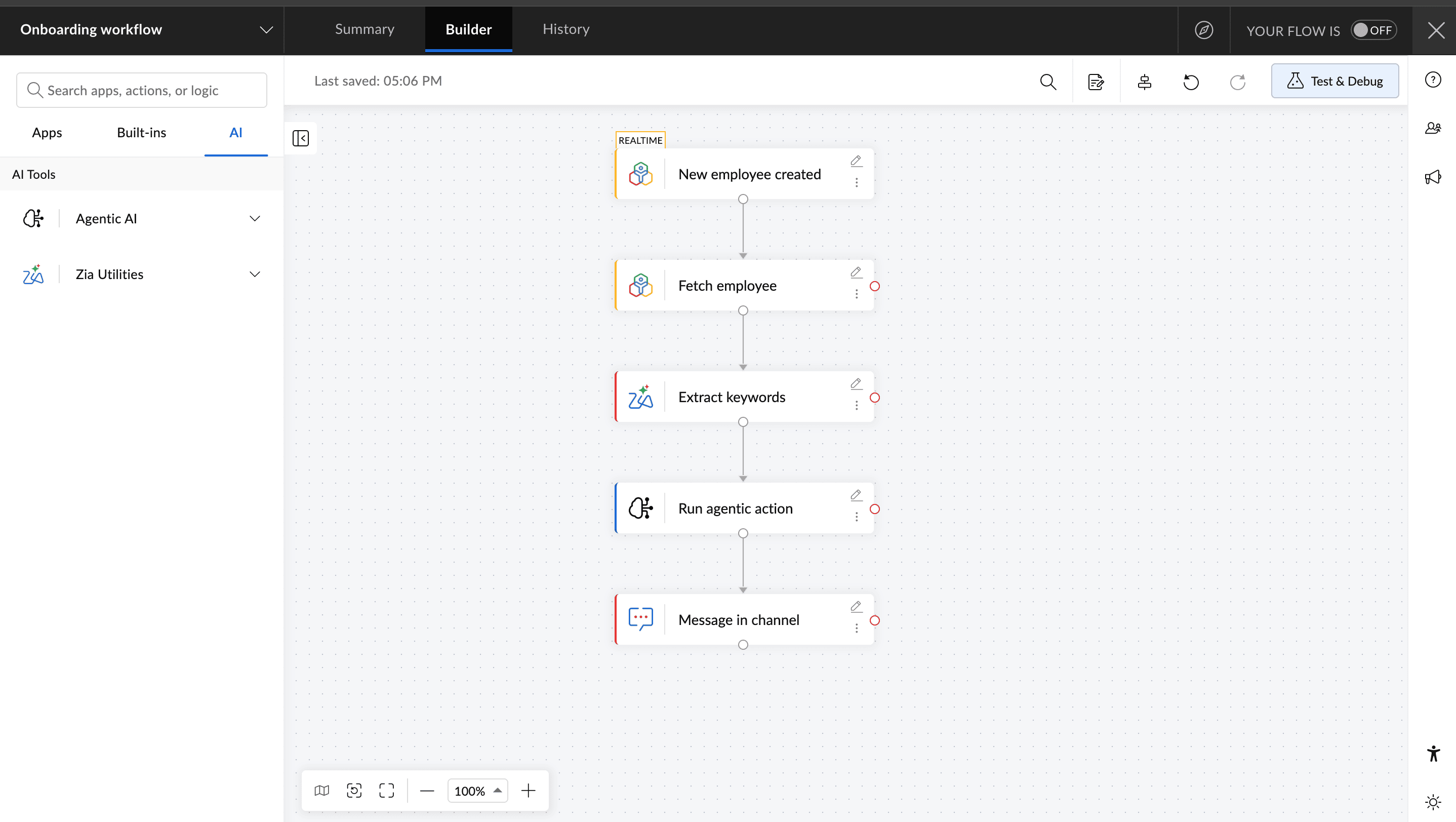
How this flow works
New employee record created in Zoho People – Triggers the flow
Fetch employee record – Pulls the role, department, and location details
Extract keywords – Zia extracts the key details from the employee record
Run agentic action – Zia evaluates the details and picks the appropriate onboarding actions
Message in channel – Notifies the relevant team lead
Content or approval routing
The problem
Creative and marketing teams often have content going through review, like social posts, campaign copy, and design assets. Who needs to review what depends on the content type, channel, and campaign. Managing this manually over email or chat creates delays and confusions.
How Flow solves it
When a new content item is submitted via a project management tool like Zoho Projects, Zia reads the content type and campaign details and routes it to the right reviewer. A social post goes to the social media lead. A paid ad goes to the performance team. Design content goes to the design lead.
The outcome
Reviews happen faster. Nothing gets missed waiting for the wrong person to forward it. The right person gets to review it without any setbacks.
Refund and return request handling
The problem
Every refund or return request needs someone to look at it. They need to check the order value, read the reason, and pull up the customer's history before deciding what to do next. For ecommerce teams handling a high volume of orders, doing this manually for every request slows things down and leads to inconsistent decisions.
How Flow solves it
When a refund request is submitted in Shopify or WooCommerce, Zia reads the order value, the reason provided, and the customer's history. Based on that context, it picks the right action: Auto-approve the refund, route it to the support team for review, or escalate it for a closer look.
The outcome
Simple returns get processed automatically. Anything that needs a closer look goes to the right person straight away. Your support team only steps in when it actually matters.
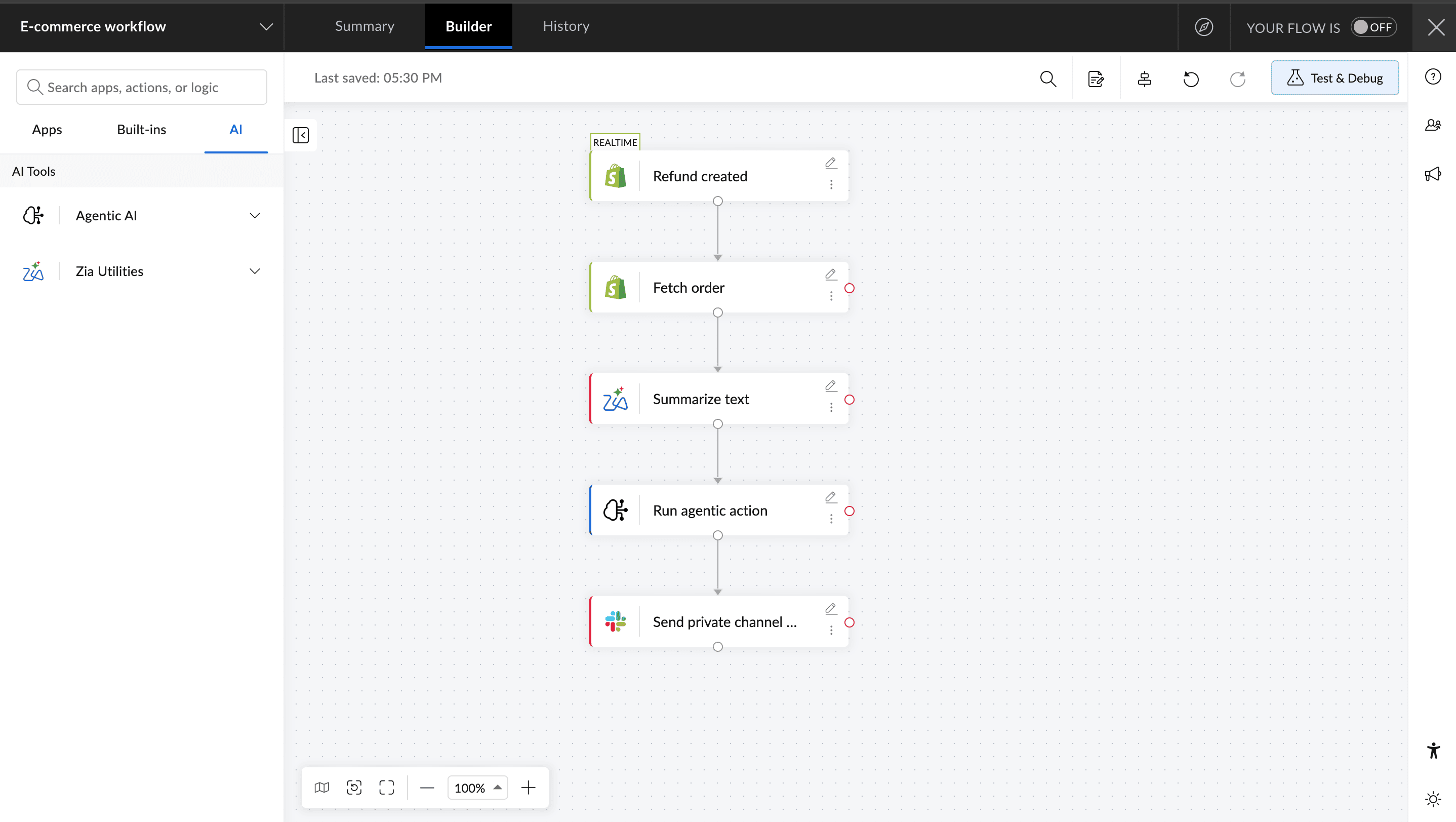
How this flow works
Refund request created in Shopify - Triggers the flow
Fetch order details – Pulls the order value, items, and purchase history
Summarize request – Zia condenses the reason and context
Run agentic action – Zia evaluates the details and picks the right action
Notify in support channel - Refund is approved, routed, or escalated accordingly
Step-by-step guide to setting up agentic actions in Zoho Flow
Step 1: Enable AI in Zoho Flow
Go to Settings and select AI Setup. Click Enable AI to activate Zia's capabilities across your flows. Note that only an organization admin or owner can enable or disable AI.
Step 2: Configure your agentic actions
Before building your flow, you need to define the actions Zia can choose from. In AI Setup, click Add Action and select the app and action you want to configure: for example, sending a Cliq notification, creating a CRM record, or moving a support ticket to a different department.
For each action, decide how each field value should be handled. You can either enter a fixed value, select Let AI decide to allow Zia to fill it dynamically at runtime, or leave the field empty. Once done, add an action description. This is what Zia reads to decide which action to pick, so make it clear and specific.
Step 3: Add the Run agentic action step to your flow
In the flow builder, open the AI tab and under Agentic AI, drag the Run agentic action step into your workflow. In the configuration window, select your response type: Plain Text or JSON. If you choose JSON, specify the key-value pairs you want Zia to extract and pass to the next steps.
Step 4: Write your prompt
In the What do you want the agentic action to do? field, describe what Zia should evaluate and act on. You can map data from previous steps directly into the prompt: for example, referencing the ticket description or order value from the trigger.
Step 5: Turn on the flow and test
Turn the flow on and run it with sample data to see how Zia interprets different inputs and which actions it picks. Test with a range of scenarios before using it in practice. If needed, go back and refine your action descriptions or prompt wording. Small changes can affect how Zia decides.
The real value of agentic workflows is that they remove the need for people to make the same routine decisions over and over again. When a workflow can understand context and choose the right next step, teams can spend less time managing processes and more time on work that actually moves the business forward.
With Zoho Flow's agentic actions, you can bring AI-driven decision-making into the workflows you already use. If you're already on Zoho Flow, the agentic actions feature is available now. Try it on a workflow where your team currently makes repetitive decisions manually and see the difference it makes.
Frequently asked questions
1. Do I need coding skills to set up agentic actions in Zoho Flow?
No. Agentic actions in Zoho Flow are configured through the flow builder using natural language prompts. You describe what you want Zia to evaluate and act on, and it handles the rest. No code required at any step.
2. Do agentic actions replace decision blocks in Zoho Flow?
No. Agentic actions complement decision blocks rather than replace them. If you have a straightforward condition with a predictable outcome, a decision block still works well. Agentic actions are better suited for situations where the right action depends on context that varies with every trigger.
3. Does using agentic actions cost extra in Zoho Flow?
Each execution of an agentic action consumes tasks from your current billing cycle. You can track usage under Settings and Billing and Usage in your Zoho Flow account.
4. Can I use agentic actions with non-Zoho apps?
Yes. Zoho Flow connects with over 1,000 apps, including third-party tools like Shopify, Slack, QuickBooks, and more. Agentic actions work across any app connected to your workflow.
5. Is my data safe when using agentic actions?
Yes. Zia only analyzes your prompts and app connections within your Zoho Flow workspace. Your data is not used to train Zia or shared outside your workspace.
 Gayathri Babu
Content writer for Zoho Flow. Passionate about creating engaging content that truly resonates with the readers.